The creative workspace for your next campaign.

Your product.A whole newstory.

Turn product photos into videos, ads and social content. Bring an idea. Find your direction. Make it Manyframe.

Your references. Your model. Your say.

Illustrative orange drink campaign with citrus and a splash of water
Image concept
Illustrative coral sneaker campaign on violet rocks
Image concept
AI-generated blue headphone animation with a slow camera move across a wooden desk
A still. A moving shot.Seedance 2.5 · 5 seconds

Made in Manyframe

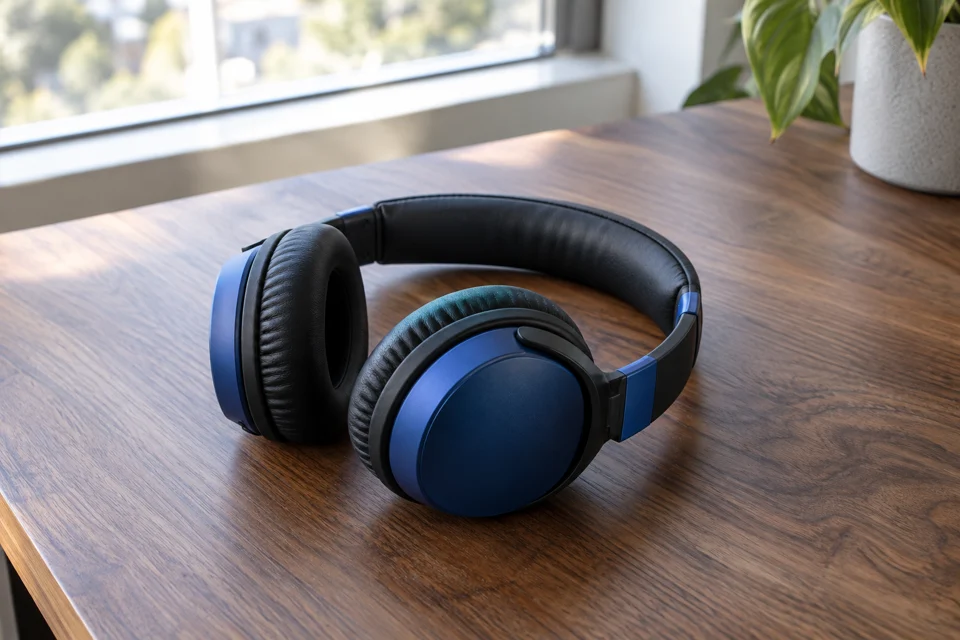
AI-authored source frame of blue headphones resting on a wooden desk

Start with a frame. Direct the motion.

AI-authored references and image concepts.
The exact prompt & settings
Model
doubao-seedance-2-5-260628
Requested in Studio
Animate image · 5 seconds ·1280 × 720
Delivered video
1280 × 720 · 5.04 seconds · silent
Original source
1536 × 1024 · AI-authored

Motion direction

One continuous five-second premium product photography shot of the headphones in the reference, resting on the wooden desk. The product is completely stationary. Preserve the exact shape, headband curvature, hinges, earcups, cushions, texture and proportions throughout. Make a slow, subtle camera slider move from left to right, no more than ten centimeters, with a slight forward push. The window creates soft constant daylight and restrained highlights. Real optics and gentle parallax. No product rotation, floating, deformation, opening or folding, added parts, morphing, logos, particles, smoke, flashing light or extreme shallow focus. Keep the full headphones readable.

Try Seedance 2.5

People. Places.
Your point of view.

A glance across the café. A walk down the street. Start with your own photograph and direct what happens next.

A quiet moment at the café.

Natural light, a relaxed portrait and one quiet camera move.

Studio-generated café portrait animation with a slow push-in and restrained natural movement

Wan 2.6 I2V5 secondsStudio · image to video

AI-authored café portrait of an adult in an indigo apron holding a ceramic cup behind a counter

Source image

AI-authored reference
Animate your café photo
See the motion brief
Model
wan2.6-i2v
Requested in Studio
Animate image · 5 seconds ·1280 × 720
Delivered video
1080 × 720 · 5 seconds · silent
Original source
1536 × 1024 · AI-authored

Motion direction

One continuous five-second commercial documentary shot. A café owner stands behind a counter holding a ceramic cup at waist height. Keep their face, hands, apron, cup and café exactly consistent with the reference. The owner makes a small natural breath and a subtle relaxed glance toward the window. The cup stays steady; fingers retain their positions. The camera makes a very slow, straight push in, about five percent closer. Natural window light stays constant. Realistic human movement and normal physical scale. No cup lifting, talking, pouring, hand gesture, object transformation, focus pumping, dramatic light change, smoke or added objects.

A few steps into the day.

Everyday clothing, a grounded setting and a simple walking beat.

Studio-generated streetwear animation with a relaxed walking direction and steady camera tracking

Wan 2.6 I2V5 secondsStudio · image to video

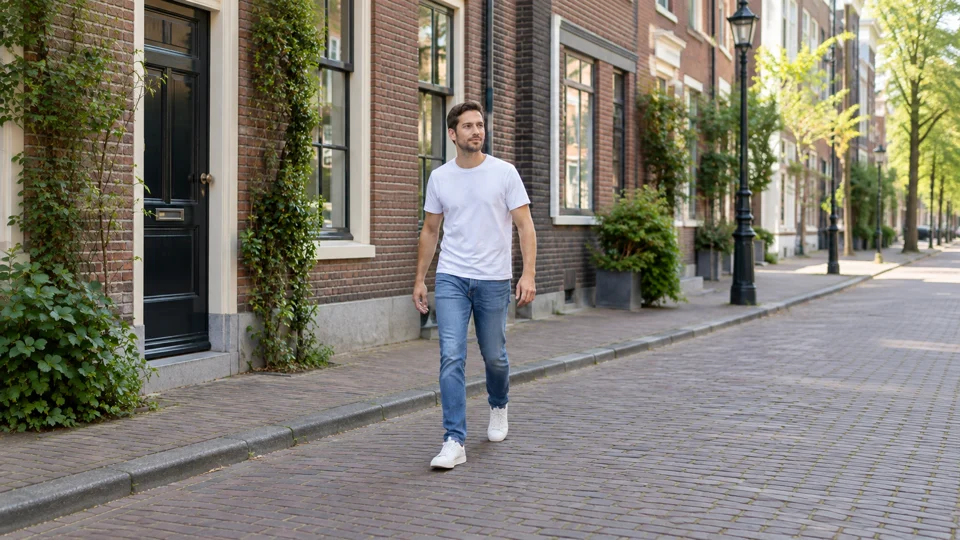
AI-authored source image of an adult in a plain white T-shirt and denim on a brick-lined street

Source image

AI-authored reference
Direct a lifestyle clip
See the motion brief
Model
wan2.6-i2v
Requested in Studio
Animate image · 5 seconds ·1280 × 720
Delivered video
960 × 540 · 5 seconds · silent
Original source
1672 × 940 · AI-authored

Motion direction

One continuous five-second lifestyle clothing commercial. The person in the reference takes two small natural steps along the street at a relaxed pace. Keep the same identity, face, hair, denim garment, white T-shirt, body proportions and background architecture. Arms swing gently and fabric responds subtly to walking. Track alongside the person at the same slow pace with a steady camera, without orbiting. Natural daylight remains constant. The feet contact the pavement and the body weight shifts convincingly. No dancing, running, turn to camera, talking, exaggerated wind, flowing fabric effects, wardrobe transformation, extra limbs, background morphing, traffic entering the frame or new objects.

Your product belongs
in the story.

Bring the references. Shape the plan. Review the scenes. Keep the pieces together in Manyframe.

Find your workflow
Pink glass fragrance bottle on pink stone, framed by flowers
The starting point.Illustrative product reference

Trend Story: Reveal

Sample story plan
  1. Problem

    A busy morning.

    Open on the everyday rush.

  2. Reveal

    A moment to pause.

    Introduce the bottle in the same setting.

  3. Payoff

    Make the product the focus.

    Close with the bottle and a clear invitation.

Your saved project

  • 9:16 videoThe assembled story
  • Cover + captionReady to review
  • Scene assetsIndividual clips and frames

Product Motion

Sample motion direction
Creative direction

Let the camera
come closer.

Slow push-in. Steady daylight. Keep the bottle, glass and cap consistent with the reference.

Your output

  • One motion clip5 seconds · 9:16 · silent
  • Cover and source ZIPImage, clip, settings and manifest

Ads Generation

Sample ad concepts
  1. Product first

    A moment, bottled.

    Show the whole bottle. Leave room for copy.

  2. Everyday context

    Make room for a ritual.

    Place the product in a quiet daily setting.

  3. A closer look

    Meet the fragrance.

    Bring the glass, cap and texture forward.

Your ad pack

  • Three static ads1080 × 1350 each
  • Cover previewReview the finished set
  • Source ZIPAds, images and copy files

A workflow illustration, using a fictional product. Review generated product details before export.

Big ideas.
Clear spending.

Explore with a prepaid wallet. Review image and video quotes before approving generation. Optional AI storyboard writing is charged separately through the text model you choose.

How pricing works
  1. Find your direction.

    Pick the workflow, model and supported settings for the work.

  2. See the quote.

    Review the maximum charge in the studio before a paid run.

  3. Make the call.

    Approve generation when the plan and price work for you.

Good questions. Clear answers.

Still curious? Browse all FAQs

What can I start with?

Use a product photo for Product Motion, several references for a story, or a compact business brief for a content pack. Each workflow tells you which inputs it needs before you start.

Do I need to choose an AI model first?

Start from the outcome you want to make. Available model routes and supported settings appear in the studio, alongside the quote, when you need them.

Will every detail of my product stay exact?

AI generation can change packaging, lettering, shape or materials. Review your references and generated frames carefully; use controlled text overlays when exact wording matters. Product consistency is a review step, not a guarantee.

Can I publish to social accounts?

Manyframe supports account-based publishing and scheduling where the platform integration is available. Access depends on account eligibility, platform permissions and current onboarding limits. Review each destination before publishing.

Your next idea. Make it Manyframe.

Bring your product. Keep your references, projects and creative decisions in one workspace.

Let’s make something