A frame. A direction. A little motion.

Start with a frame. Make the moment.

Explore product and portrait clips generated in Manyframe Studio. See the source image, the motion direction and the model behind each take.

Studio animations come first. Sample workflow briefs and review plans follow.

Generated in Manyframe Studio.

Give your images
a little motion.

A product close-up. A café portrait. A little movement on the street. Start with an image and give the shot a clear direction.

AI-authored source frames; videos generated in Manyframe Studio.

Get closer to the product.

A steady product. A subtle camera move. Let material and form lead the shot.

Studio-generated headphone animation with a restrained lateral camera move

Seedance 2.55 secondsStudio · image to video
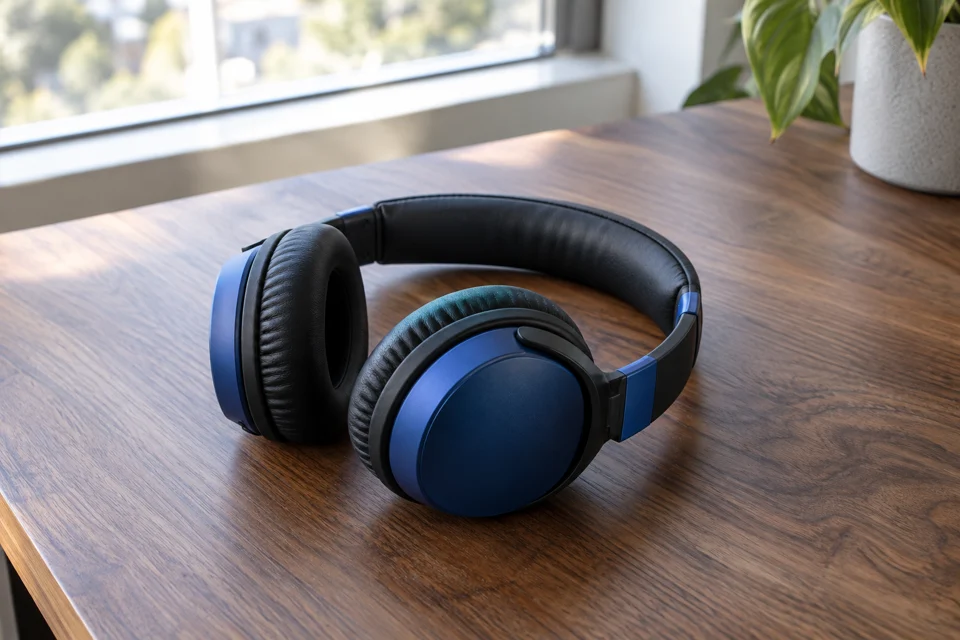
AI-authored source image of over-ear headphones resting on a wooden desk beside a window

Source image

AI-authored reference
Animate your product image
See the motion brief
Model
doubao-seedance-2-5-260628
Requested in Studio
Animate image · 5 seconds ·1280 × 720
Delivered video
1280 × 720 · 5.04 seconds · silent
Original source
1536 × 1024 · AI-authored

Motion direction

One continuous five-second premium product photography shot of the headphones in the reference, resting on the wooden desk. The product is completely stationary. Preserve the exact shape, headband curvature, hinges, earcups, cushions, texture and proportions throughout. Make a slow, subtle camera slider move from left to right, no more than ten centimeters, with a slight forward push. The window creates soft constant daylight and restrained highlights. Real optics and gentle parallax. No product rotation, floating, deformation, opening or folding, added parts, morphing, logos, particles, smoke, flashing light or extreme shallow focus. Keep the full headphones readable.

People. Places.
Your point of view.

A glance across the café. A walk down the street. Start with your own photograph and direct what happens next.

A quiet moment at the café.

Natural light, a relaxed portrait and one quiet camera move.

Studio-generated café portrait animation with a slow push-in and restrained natural movement

Wan 2.6 I2V5 secondsStudio · image to video

AI-authored café portrait of an adult in an indigo apron holding a ceramic cup behind a counter

Source image

AI-authored reference
Animate your café photo
See the motion brief
Model
wan2.6-i2v
Requested in Studio
Animate image · 5 seconds ·1280 × 720
Delivered video
1080 × 720 · 5 seconds · silent
Original source
1536 × 1024 · AI-authored

Motion direction

One continuous five-second commercial documentary shot. A café owner stands behind a counter holding a ceramic cup at waist height. Keep their face, hands, apron, cup and café exactly consistent with the reference. The owner makes a small natural breath and a subtle relaxed glance toward the window. The cup stays steady; fingers retain their positions. The camera makes a very slow, straight push in, about five percent closer. Natural window light stays constant. Realistic human movement and normal physical scale. No cup lifting, talking, pouring, hand gesture, object transformation, focus pumping, dramatic light change, smoke or added objects.

A few steps into the day.

Everyday clothing, a grounded setting and a simple walking beat.

Studio-generated streetwear animation with a relaxed walking direction and steady camera tracking

Wan 2.6 I2V5 secondsStudio · image to video

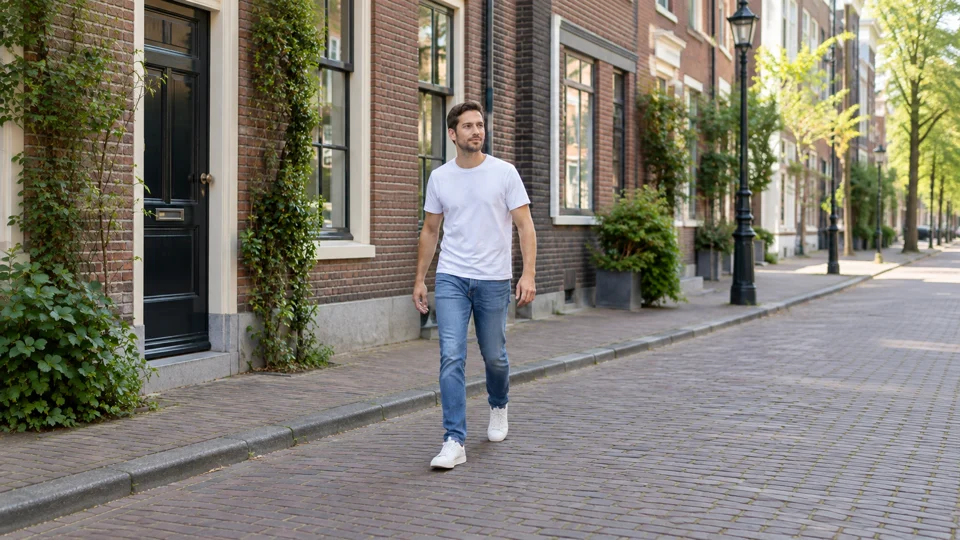
AI-authored source image of an adult in a plain white T-shirt and denim on a brick-lined street

Source image

AI-authored reference
Direct a lifestyle clip
See the motion brief
Model
wan2.6-i2v
Requested in Studio
Animate image · 5 seconds ·1280 × 720
Delivered video
960 × 540 · 5 seconds · silent
Original source
1672 × 940 · AI-authored

Motion direction

One continuous five-second lifestyle clothing commercial. The person in the reference takes two small natural steps along the street at a relaxed pace. Keep the same identity, face, hair, denim garment, white T-shirt, body proportions and background architecture. Arms swing gently and fabric responds subtly to walking. Track alongside the person at the same slow pace with a steady camera, without orbiting. Natural daylight remains constant. The feet contact the pavement and the body weight shifts convincingly. No dancing, running, turn to camera, talking, exaggerated wind, flowing fabric effects, wardrobe transformation, extra limbs, background morphing, traffic entering the frame or new objects.

Pick the output.
Keep the direction.

One image to animate. A story to build. Three ads to shape. Choose the job, then review the next step.

Explore all workflows

Sample briefs and plans below show the review process.

Product MotionFive-second vertical clip · cover · ZIP

Sample motion brief

Reference
One approved image with the whole product visible.
Direction
Slow push-in. Steady daylight. Keep the label readable and the product details consistent.
Settings
5 seconds, 9:16, 720p, without generated audio.

Review the exact quote pinned to your model, input and settings. Approve the charge before generation.

Open Product Motion
Trend Story: Reveal9:16 video · cover · caption · scenes

Sample story plan · desk organizer

  1. ProblemOpen on scattered stationery.
  2. RevealIntroduce the organizer in the same setting.
  3. PayoffEnd with the product and a clear call to action.

Review it in stages.

  1. Approve the story plan.
  2. Review the frame quote, then generate frames.
  3. Inspect the product in every frame.
  4. Approve a separate animation charge.

Delivery includes the vertical video, cover, caption and individual scene clips and frames.

Open Trend Story
Ads GenerationThree static ads · source ZIP

Sample ad plan · desk organizer

Edit the hook, body, call to action and image prompt in all three variants.

Product first

Hook
A place for every pen.
Body
Bring everyday essentials together.
Call to action
Explore the organizer
Image prompt
Front view. Leave room for copy.

Everyday context

Hook
Clear some space.
Body
Give desk essentials a home.
Call to action
See the details
Image prompt
Close-up with a quiet background.

A wider view

Hook
Start with the essentials.
Body
Put the product in your workspace.
Call to action
Find your setup
Image prompt
Context view. Show the complete product.

Approve the edited plan, review the exact quote, then approve generation.

Delivery: three 1080 × 1350 static ads and a source ZIP.

Open Ads Generation

Make the next shot yours.

Choose a model and write your direction here. Take the brief into Studio, add your own photograph and review the quote before creating.

A guide to better motion briefs

Studio

Sample brief
VideoAnimate image
157 / 4,000

Add your image in Studio

Start from the photograph you want to animate.
Continue in Studio

Take your brief with you. Add your image and review the quote in Studio.

Enabled models and settings are shown in Studio.

A little preparation goes a long way

Keep the details
that make it yours.

The reference, the factual brief and the approved settings belong together. Use each checkpoint to make a deliberate choice.

Write a better product brief

Start with a clear reference.

Show the complete product. Include the details you will need to inspect later: shape, colors, packaging, logo and lettering. Use materials you have permission to upload.

Make the brief specific.

Name the audience, the factual benefit and the action the creative should invite. For motion, describe the camera, light and background movement. For ads, refine the copy and image prompt in each variant.

Review before the next paid step.

Check the current quote for your selected model and settings. In Trend Story, inspect the generated product frames before approving the separate animation charge. Review the final assets before using them publicly.

Choose the job first

Different workflows.
Different deliveries.

Product Motion animates one approved image and keeps its source framing. Trend Story builds a vertical story with a cover, caption and individual scene assets. Ads Generation creates three static ads with controlled copy and image overlays.

Your selected model and references affect the result. Check the enabled settings, inspect product details and keep the saved project for your next revision.

Find the workflow for your next idea

Before you start.

Still curious? Browse all FAQs

Are these finished campaign results?

The videos are standalone Studio image-to-video generations from AI-authored source frames. The workflow briefs and plans below them are samples. Ads Generation and Local Business Pack deliver static images; a complete Trend Story also includes reviewed scenes, assembly, a cover and a caption.

Can I edit the three ad variants?

Yes. Ads Generation lets you edit each variant’s hook, body, call to action and image prompt, along with its captions, before approving the plan and reviewing the exact price.

Does Trend Story charge for frames and animation together?

The workflow separates those approvals. After approving the story plan, review the scene-frame charge. Inspect the product in the generated frames, then review and approve a separate animation quote.

Can I choose any model shown in the library?

The workflow shows the models available to your account for that step. Choose a supported provider and model, provide the required inputs, and review the current quote before generation.

Your image. Your next direction.

Bring a reference, choose an available model and review the quote before you animate.

Open the Studio